Why Security Headers Matter
HTTP Response Headers are how web servers communicate back to web browsers what security rules should be applied to requests. As an application developer, setting these headers can help prevent entire classes of web attacks by instructing browsers to enforce security policies.
Security headers are particularly important because they:
- Prevent XSS attacks by controlling script execution
- Stop clickjacking by preventing your site from being embedded in iframes
- Block MIME sniffing attacks that can execute malicious files
- Enforce HTTPS across your entire site
- Protect against protocol downgrade attacks
Many compliance frameworks (PCI DSS, SOC 2, HIPAA) require or recommend security headers as part of their security controls.
What Security Headers Should Be Enabled
X-XSS-Protection
Controls the browser’s built-in XSS filter. While modern browsers have deprecated this in favor of Content Security Policy, it still provides protection for older browsers.
Recommended value: 1; mode=block
X-Frame-Options
Prevents your site from loading in an iframe, protecting against clickjacking attacks where attackers overlay your site with invisible elements to trick users into clicking malicious content.
Recommended value: DENY or SAMEORIGIN
X-Content-Type-Options
Prevents MIME-type sniffing attacks where browsers might execute files as a different type than declared. For example, an attacker might upload a malicious file disguised as an image.
Recommended value: nosniff
Strict-Transport-Security (HSTS)
Instructs browsers to only communicate over HTTPS, preventing protocol downgrade attacks and cookie hijacking. Once enabled, browsers will automatically upgrade HTTP requests to HTTPS.
Recommended value: max-age=31536000; includeSubDomains
Content-Security-Policy (CSP)
The most powerful security header, CSP defines approved sources for content like scripts, styles, and images. A properly configured CSP can virtually eliminate XSS attacks.
Note: CSP requires careful configuration based on your application’s needs. Contact us for help implementing a CSP policy.
Referrer-Policy
Controls how much referrer information is sent when navigating from your site. Helps prevent leaking sensitive URLs to third parties.
Recommended value: strict-origin-when-cross-origin
Prerequisites
What you need to get started:
- Expedited WAF add-on installed on your Heroku application
How To Enable Security Headers on Heroku
Step 1: Open the Security Settings
Navigate to your Expedited WAF dashboard and select the Stop Attacks page from the sidebar menu.
Step 2: Enable Security Headers
Toggle on the security headers you want to enable. Expedited WAF automatically configures best-practice values for each header.
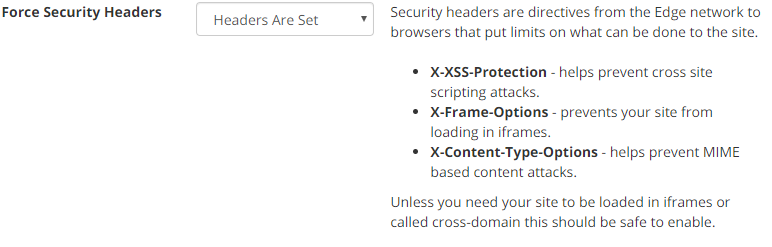
Step 3: Test Your Configuration
After enabling headers, verify they’re being sent correctly using:
- Browser Developer Tools (Network tab → Response Headers)
- SecurityHeaders.com for a comprehensive scan
Common Use Cases
Protecting a New Application
Enable all security headers from day one. It’s much easier to build your application with these restrictions in place than to retrofit them later.
Fixing Security Audit Findings
Penetration tests and security audits often flag missing security headers. Enable them through Expedited WAF without modifying your application code.
Meeting Compliance Requirements
PCI DSS, SOC 2, and other frameworks expect security headers. Enable them to satisfy auditor requirements.
Preventing Clickjacking on Sensitive Pages
Financial applications, account settings, and admin panels are common clickjacking targets. X-Frame-Options protects these critical pages.
Troubleshooting
Issue: Site breaks after enabling X-Frame-Options
- Your site may legitimately need to be embedded in iframes
- Consider using
SAMEORIGINinstead ofDENY - If you use third-party widgets that embed your content, you may need custom rules
Issue: SecurityHeaders.com shows warnings
- Some headers require additional configuration specific to your application
- Contact support for help with Content-Security-Policy implementation
Issue: Headers not appearing in browser
- Clear browser cache and test in an incognito window
- Verify the WAF is correctly proxying your traffic
- Check that headers aren’t being overwritten by your application
Related Guides
- How to Force HTTPS on Heroku
- How to Block XSS on Heroku
- How to Block OWASP Top 10 Vulnerabilities
- Web Security Guide
Resources
Learn more about Security Headers: